
OrderRing · Order messaging
v1.39.4 · NOV 13, 2026
Text customers when their order is ready.
Sends through your own Twilio, Vonage or Plivo account. Customers text back, and you answer on the order.
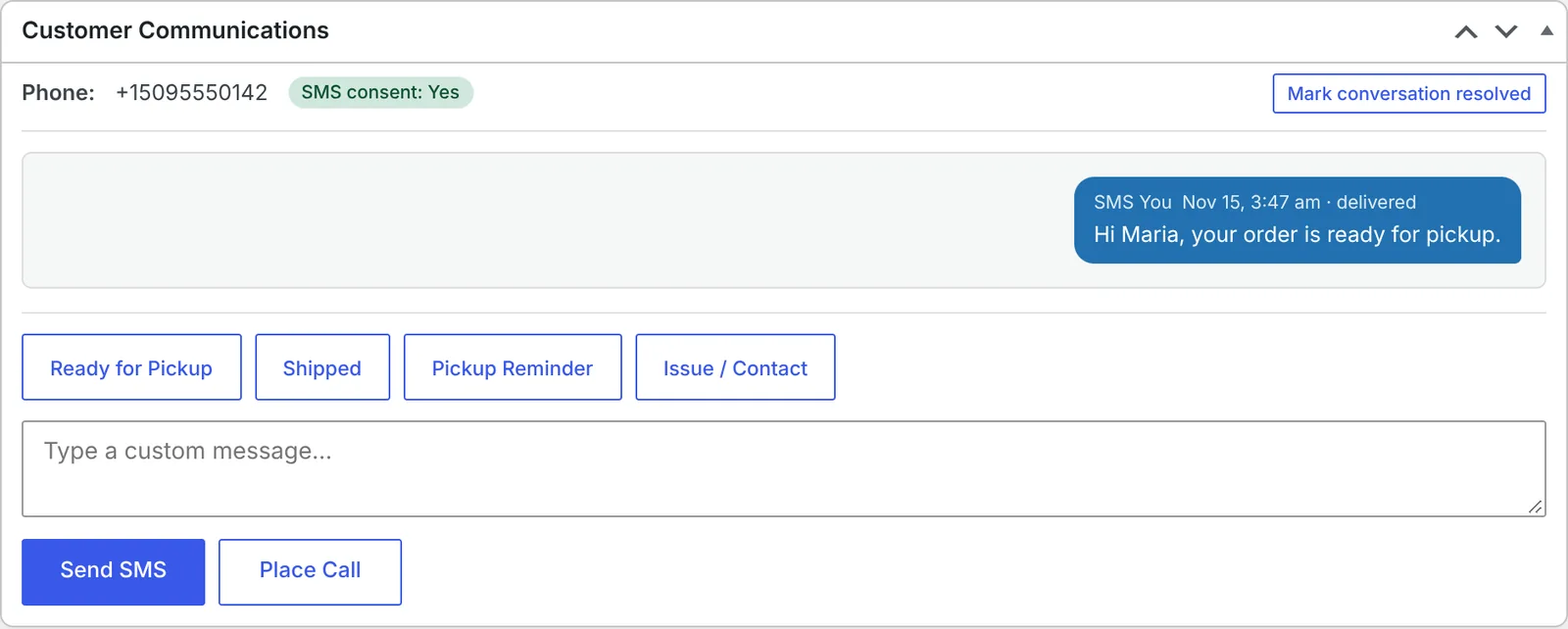
- The ready text goes out by itself.When an order moves to Ready for Pickup or Shipped, the customer gets a text. You pick the statuses and the wording.
- Replies land on the order.Customers answer by text. You see it in one inbox and on the order, and reply from there.
- Consent is handled.A checkout opt-in, STOP and HELP replies, and optional quiet hours are built in, in Lite too.
Pro · Messages inbox
One inbox for every customer text.
Every conversation in one list, with filters for unread and needs reply. Opted-out numbers are marked, so nobody gets texted by mistake.

Pro · Dashboard
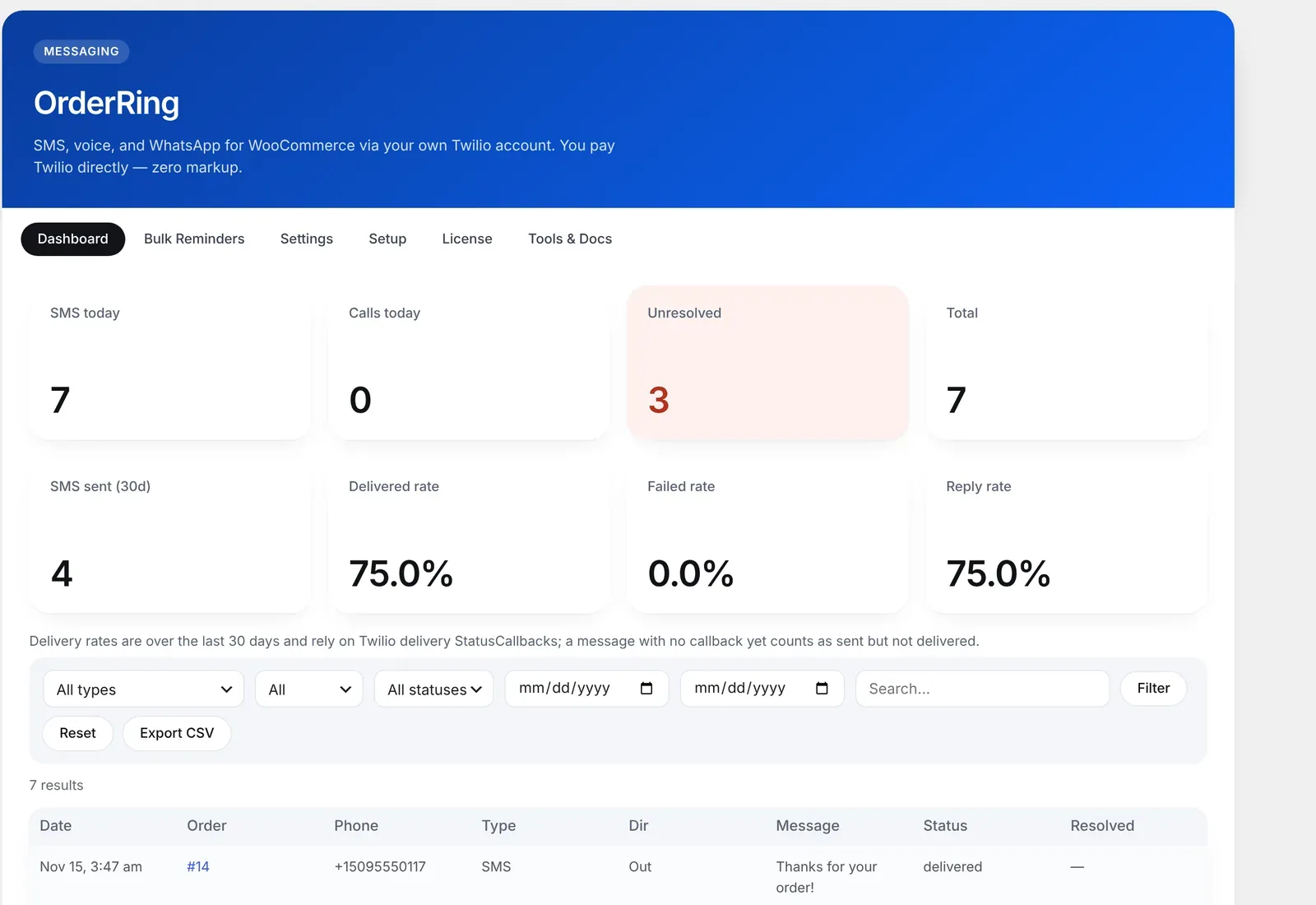
See what was sent, and what failed.
Counts for today, delivery and reply rates from your provider’s delivery reports, and a log you can filter and export to CSV.
Pro · Voice and WhatsApp
Call or WhatsApp from the same order.
Place a call or send a WhatsApp message from the order screen. Voice and WhatsApp work through Twilio only. Vonage and Plivo cover SMS, and are marked beta.
- SMSTwilio · Vonage (beta) · Plivo (beta)
- Replies and STOPAll three providers
- Voice callsTwilio
- WhatsAppTwilio, approved sender
- Message feesYour provider’s rates, no markup
Compliance
Consent, quiet hours, STOP and HELP.
These are tools, not legal advice. You still register your sending number with your provider (in the US, A2P 10DLC registration).

- Checkout opt-in. An unticked consent box on classic and block checkout. The answer is stored on the order.
- No consent, no automatic text. Orders without consent on record are not texted by the automations.
- STOP and every US opt-out word. STOP, QUIT, END, REVOKE, OPT OUT, CANCEL, UNSUBSCRIBE and plain replies like “please stop texting me” opt the number out. START opts back in. STOP also blocks calls.
- HELP and INFO. The customer gets your help reply automatically.
- Quiet hours. Optional. Automatic texts wait until morning in the customer’s own time zone.
- A record of every message. Direction, status and time, kept in your database.
Lite or Pro
Start free. Upgrade for the inbox, calls and WhatsApp.
| Feature | Lite | Pro |
|---|---|---|
| Ready for Pickup text, or any status you map | ✓ | ✓ |
| Send a text from the order screen | ✓ | ✓ |
| Checkout opt-in, STOP, HELP, START | ✓ | ✓ |
| Quiet hours in the customer’s time zone | ✓ | ✓ |
| Twilio, Vonage or Plivo for SMS | ✓ | ✓ |
| Messages inbox and two-way chat | — | ✓ |
| Voice calls and WhatsApp (Twilio) | — | ✓ |
| Delivery-stage texts (TrackShip, with tracking numbers from Zorem’s Advanced Shipment Tracking) and owner alerts | — | ✓ |
| Bulk pickup reminders | — | ✓ |
| Back-in-stock texts, cart coupons, tracked links | — | ✓ |
| Price per year | Free | $79 |
30-day money-back guarantee. If a license ends, your settings and data stay on your site. Agency covers up to 5 sites for $199 a year. All prices.
Requirements
What you need first.
- WordPress6.2 or later
- WooCommerce7.0 or later, HPOS ready
- PHP7.4 or later
- Provider accountTwilio, Vonage or Plivo
- Sending numberFrom your provider, registered for SMS
Setup
About five minutes in WordPress.
Once your provider account and number are ready, the setup wizard takes about five minutes. Number registration happens in your provider account and can take days in the US. Plan for that first.
- Install Lite or Pro and run the setup wizard.
- Paste your provider keys and sending number.
- Pick which order statuses send a text, and edit the wording.
- Place a test order and send yourself the ready text.
Questions
OrderRing, plainly.
Do I need my own Twilio account?
Yes, or a Vonage or Plivo account for SMS. You create it, buy a number there, and paste the keys into OrderRing. Voice calls and WhatsApp need Twilio.
Does Tillpress charge per message?
No. Your provider bills you directly at its own rates. Tillpress adds nothing on top.
Can customers reply?
Yes. Replies, STOP and delivery status work with all three providers. Pro adds the Messages inbox, so you can read and answer replies in one place and on the order.
What happens with no key, or when my license lapses?
If a license ends, your settings and data stay on your site. If OrderRing Lite is installed and set up, it can keep sending its free texts.
Does it work without WooCommerce?
Order texts need WooCommerce. Account and form notifications also work on a plain WordPress site. See the docs for details.
Can I try it first?
Install Lite from WordPress.org, or try the browser demo. Pro has a 30-day money-back guarantee.