
WooCommerce PDF invoices and packing slips, with a fulfilment desk.
Basic PDF invoicing stays free in this zip. Pro adds batch fulfilment, tracking, returns, aging alerts, and supported e-invoice file export. Export only — OrderBay does not transmit through Peppol, PDPs, or government portals.
Interactive sandbox — no signup required.
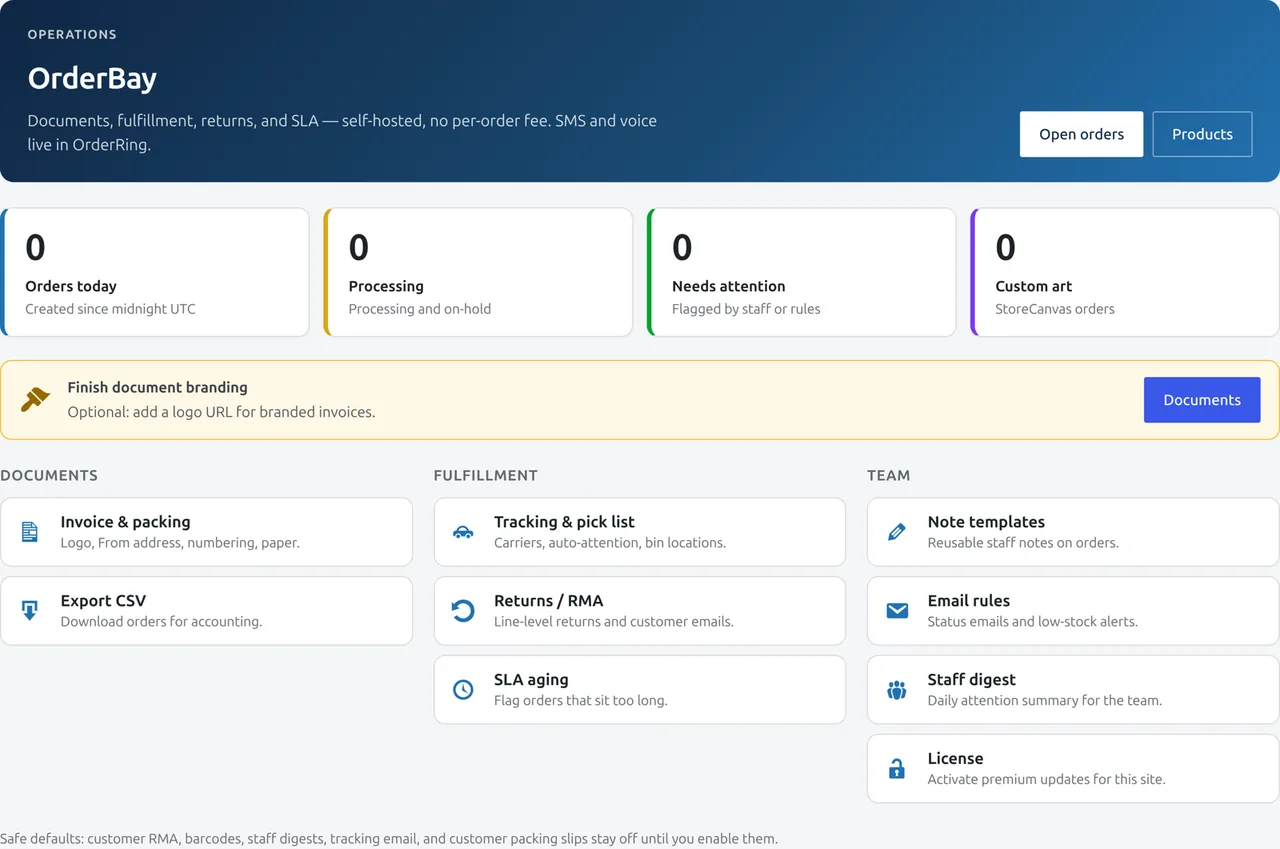
Everything you need, nothing you don’t.
The features that matter for OrderBay, in plain language.
Basic invoices, free
Sequential PDF invoices with the tax fields you fill in. Always free. Not tax advice.
Packing slips
Print packing slips and pick lists for the warehouse.
Bulk fulfilment
Mark, print and process many orders in one action.
Branded PDFs
Put your logo and details on every document in Pro.
EU/UK VAT fields
Capture and show the VAT fields your region needs.
Export
Export orders and documents for accounting.
Free invoices vs the operations desk
One zip. Basic invoices stay on if the license lapses. Packing, tracking, returns, and e-invoice files need the 30-day window, an active key, or grace.
| Feature | Always free in this zip | Pro |
|---|---|---|
| Sequential PDF invoices, attached to order emails | Yes | Yes |
| Packing slips, delivery notes, shipping labels, proformas | No | Yes |
| Bulk document generation | No | Yes |
| UBL 2.1 and Factur-X/CII XML export | No | File creation only |
| Tracking, item-level RMA, aging / SLA alerts, staff digests, low-stock alerts | No | Yes |
| Peppol / PDP / government submission | No | Not included |
Document formats (Pro 1.12.2)
| Capability | Supported | Limitation |
|---|---|---|
| Sequential PDF invoices | Yes | You fill tax and business settings. Not tax advice. |
| Packing slips | Yes (Pro) | Not a tax document. |
| UBL 2.1 (Peppol BIS Billing 3.0) XML | Yes (Pro) | EN16931 baseline export. Validate before production use. |
| CII / Factur-X XML | Yes (Pro) | EN16931 profile XML. Factur-X PDF/A-3 assembly needs a host PDF engine and horstoeko/zugferd. |
| Peppol network or national PDP | No | Use another access point if you must transmit. |
A separate free plugin is at tillpress.com/orderbay-lite (invoices, credit notes, UBL/CII). It is not on WordPress.org yet. Sample validated XML files are not published — generate one on a staging shop and run it through an official validator. How to export and check the XML.
Try OrderBay before you install it.
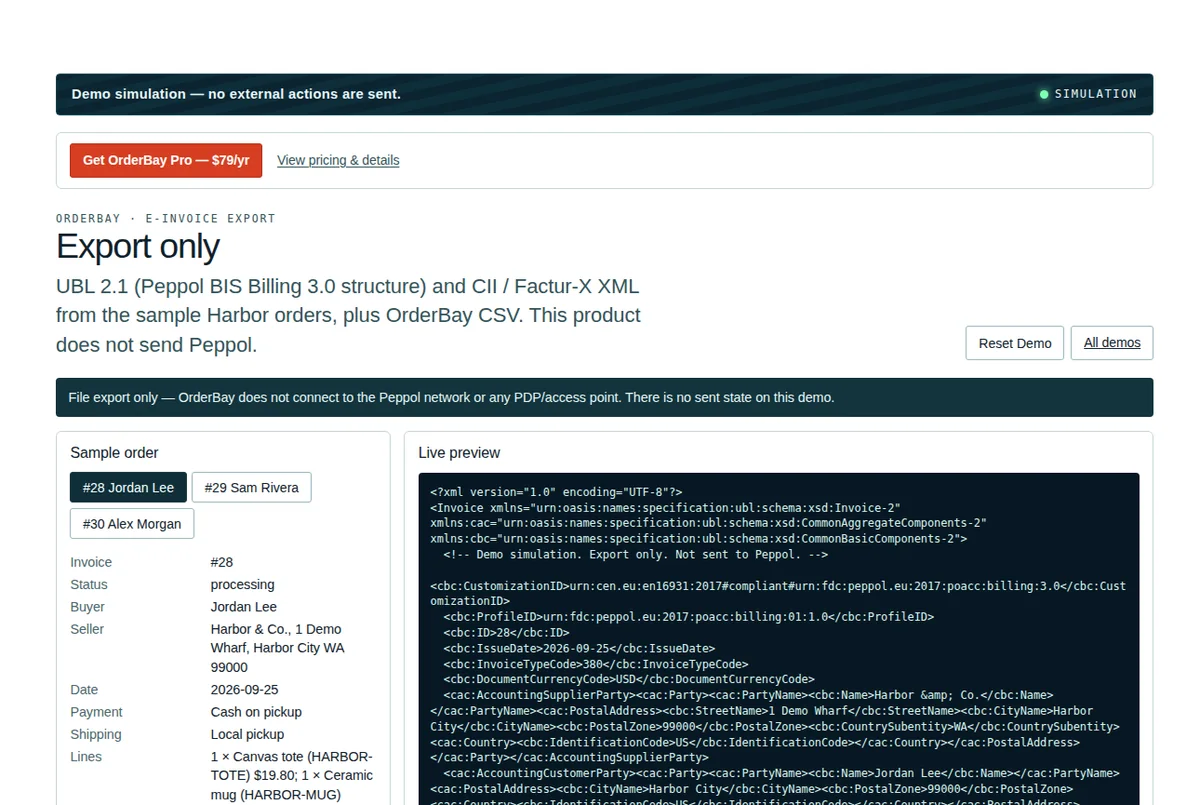
Inspect the file-export workflow using fictional orders. The demo never sends Peppol or transmits an invoice.
- Switch between sample WooCommerce orders and inspect invoice fields.
- Preview UBL 2.1, CII / Factur-X XML and CSV structures.
- Download a generated demo export locally; there is no network send state.
Simulation only — no external actions are sent.
One price. No markup.
You pay for the plugin. The services it uses, you pay their providers directly.
OrderBay · Pricing
Or a 1-month license, $10 for seasonal or temporary use. No automatic renewal. Unused days credit the one-year key; they are not cash.
The Pro code includes a 30-day unlicensed window; public access currently starts with paid checkout.Basic invoicing stays free · 30-day refund · no auto-renew
See it in the store.
Real admin screens from OrderBay.
Guides and comparisons
Questions
Is invoicing really free?
Yes — basic invoices stay free inside the OrderBay zip, including after a Pro license lapses. A separate free plugin, OrderBay Lite, is a free plugin (invoices, credit notes, UBL/CII), but its public WordPress.org listing is still pending. The paid OrderBay zip currently arrives after checkout (or a 1-month license). Pro adds packing slips, bulk actions, and branding. This is not a claim that every jurisdiction’s e-invoicing mandate is met.
Does OrderBay take a cut of orders?
No. Commission on orders is $0.00. You pay only the Pro license if you want the extras.
Can I brand the PDFs?
Yes, in Pro. Add your logo and business details to invoices, slips and notes.
Does it handle EU/UK VAT?
OrderBay includes VAT fields you fill in. That is not a claim that every jurisdiction’s e-invoicing mandate is met. Confirm with your accountant.
Does OrderBay send invoices over Peppol?
No. Pro can export UBL 2.1 and Factur-X/CII XML files. Transmission through Peppol or a national clearance platform is not included.
What happens if my license expires?
Pro features pause after the license and grace window. Your data and settings stay intact on your server:
- OrderRing Lite pickup SMS keeps running. No key.
- OrderBay basic invoices keep running. No key.
- Pro features pause after the license and grace window: OrderRing sending (SMS, voice, WhatsApp, chat, auto-notify), StoreCanvas live mockup and print export, OrderBay packing slips, branded PDFs, bulk actions, and the fulfilment desk. Settings are preserved. Renewing resumes them.
Version & requirements
- High-Performance Order Storage (HPOS): Fully compatible. Sequential invoice numbering and VAT metadata operate cleanly on HPOS tables.
- WooCommerce Checkout Blocks: Fully supported. Automated PDF and XML invoice generation triggers reliably on block orders.
- E-Invoicing Standards: Generates validated UBL 2.1 XML invoices. Read our UBL 2.1 guide and the full compatibility reference.
Compare OrderBay
- OrderBay vs WooCommerce PDF Invoices & Packing Slips — documents vs the whole fulfilment desk.
- WooCommerce e-invoicing and the EU mandates — what OrderBay exports, and what it does not.
- Best WooCommerce invoice & packing slip plugins (2026) — the full roundup.
Ready to add OrderBay?
Install in minutes. Pay once, or opt in to auto-renew.
OrderBay does not use Twilio. E-invoice XML is file export only — no Peppol or PDP delivery. Not tax advice.